Contact

Princeton University Cataloging Documentation
Contact |
Princeton University Cataloging Documentation |
OCLC Return to OCLC main Customize toolbar Quick tools
|
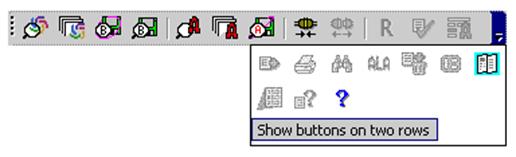
Display toolbar in 1 or 2 rows Click the arrow on the main client toolbar (located at the right end if the toolbar is horizontal or on bottom if toolbar is vertical:
The drop-down shows any overflow toolbar buttons and provides a command to toggle between showing the main toolbar on one row or two:
|
| ©2008 Princeton University Last Modified 09/04/2008 |